Contract Search
Excel Price Feed makes it easy to find Interactive Brokers contracts and use them in your market data formulas. Use Contract Search to look up instruments by name or by full contract details, then insert formulas directly into your spreadsheet.
On this page:
- What is an Interactive Brokers contract?
- Where is Contract Search?
- General Text Search
- Specific Contract Search
- How do I insert a market data formula?
What is an Interactive Brokers contract?
In Interactive Brokers, a contract is the precise definition of one tradable instrument, not merely a ticker or company name, but the full set of attributes (symbol, security type, exchange, currency, and for derivatives, expiry and strike) that IB uses to identify what you want to price, trade or analyse. Market data and portfolio requests are always tied to a contract.
Contracts are important because many symbols are ambiguous across exchanges and asset classes. The contract object specifies all the details needed to identify the instrument exactly.
Typical contract fields include the symbol, security type (stock STK, option OPT, etc.), currency, etc.
Excel Price Feed formulas reference contracts by contract ID (conId) or by the contract details you obtain from Contract Search.
Where is Contract Search?
Excel Price Feed makes it easy to find contracts with the Contract Search screen. You can find it by selecting the "Interactive Brokers" tab and then the "Market Data" tab on the Configuration Pane:
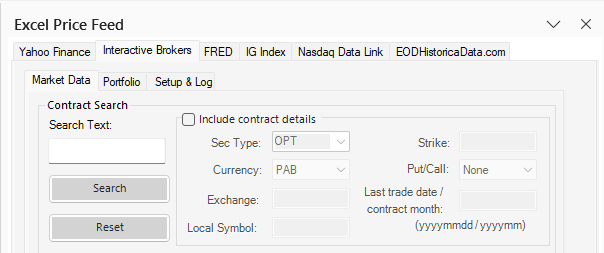
There are two search modes: general text search and specific contract search.
General Text Search
Use this feature when you just want to search on some text such as part of a name and don't necessarily know more details such as the symbol/ticker. This method works particularly well for finding stock contracts.
- Type the text you want to search for into the box
- Leave the "Include contract details" checkbox unticked
- Press ENTER or the "Search" button
- Find the Contract Id in the first column of the results
For the example below we have searched for "apple":
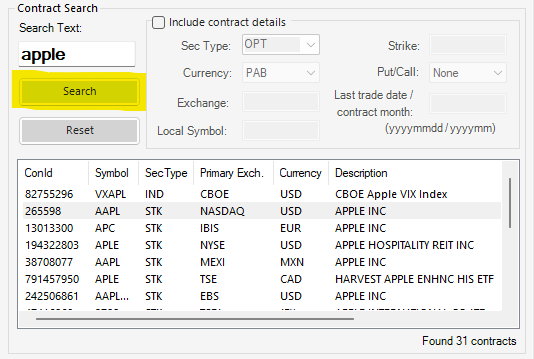
The NASDAQ listed stock contract is highlighted.
Specific Contract Search
If you are more familiar with IB contracts and have more details of the contract you are searching for you can narrow down the search further.
- Type the Symbol you want to search for into the box
- Tick the "Include contract details" checkbox.
- Fill in as much information as you can such as the Security Type, Currency, Exchange, Local Symbol, Strike, Put/Call, Last trade date/contract month in the relevant fields.
- Press ENTER or the "Search" button.
- Find the Contract Id in the first column of the results.
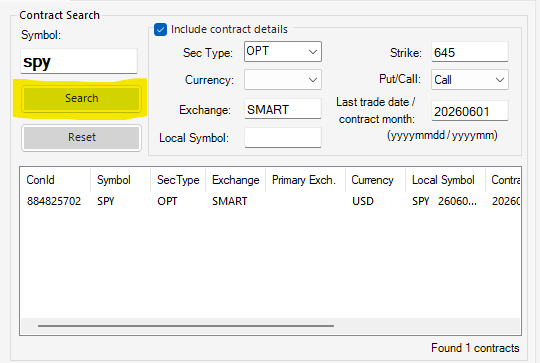
For the example below we have filled out all the details of a specific SPY 645 strike call option with expiry of 01 June 2026 (20260601):
How do I insert a market data formula?
Once you have found the contract you are interested in, there are two ways you can use to quickly add market data formulas to your spreadsheet.
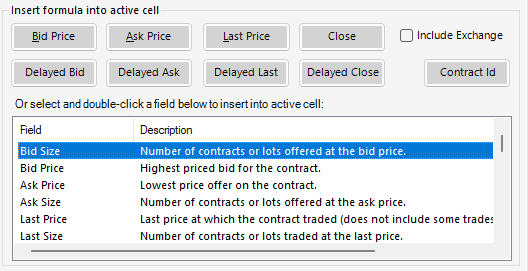
You can either highlight the contract in the list and press one of the shortcut buttons to insert the appropriate market data formula, such as Bid Price or Last Close:
The formula will be inserted into the currently active Excel cell:
=EPF.IB.Stream.MarketData.ConId("BidPrice", "880303615")
Alternatively, there is a more comprehensive list of all available fields in the box below the buttons. To insert a formula simply double-click on the row.
Some contracts (for example Bitcoin) require the Exchange it is listed on to be specifically specified, in which case you can select the "Include Exchange" option:

=EPF.IB.Stream.MarketData.ConId("BidPrice", "479624278", "PAXOS")
For more information on the market data Excel formulas: Market Data Formulas