Excel Formula Reference: Market Data
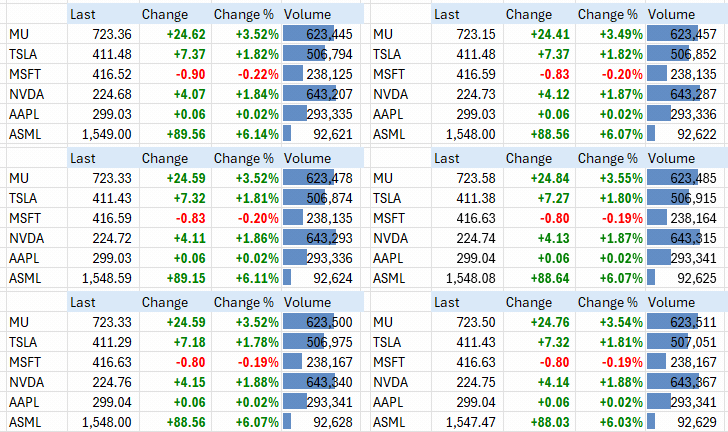
Excel Price Feed enables you to stream live Interactive Brokers market data directly into your Excel spreadsheet via simple Excel formulas.
Please see this article on the Interactive Brokers website for details on how market data subscriptions work: https://www.interactivebrokers.com/campus/ibkr-api-page/market-data-subscriptions/#introductionOn this page:
- How much live data can I stream?
- Default Currency
- Market Data Formulas
- Formula: EPF.IB.Stream_MarketData
- Formula: EPF.IB.Stream_MarketData_ConId
- Formula: EPF.IB.Stream_MarketData_Symbol
- All Fields
- Security Types
- Exchanges
How much live data can I stream?
All Interactive Broker clients initially receive 100 concurrent lines of real-time market data and always have a minimum of 100 lines of data.
This limit can increase based on various factors, please see this article on the Interactive Brokers website for more details: https://www.interactivebrokers.com/lib/cstools/faq/#/content/1136177958
To view the current number of market data lines that you are requesting, in TWS press CTRL + ALT + = (or CTRL + ALT + C for non-English keyboards).
Default Currency
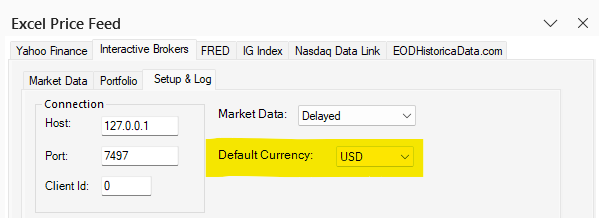
When requesting market data for a security, it is generally necessary to specify the currency of the security. To simplify this there is a "Default Currency" setting on the Setup tab, which enables you to set a default currency which will always be used when you don't specify a currency when using one of the market data formulas:
Market Data Formulas
You can either enter the formula manually in your spreadsheet or use the Configuration Pane to easily insert the most common formulas into your spreadsheet.
Excel Price Feed provides many market data formulas including 3 generic formulas which can return any field and many field specific formulas:
| Formula | Description |
|---|---|
| EPF.IB.Stream_MarketData | Stream any field for any security. |
| EPF.IB.Stream_MarketData_ConId | Stream any field for the specified contract id. |
| EPF.IB.Stream_MarketData_Symbol | Stream any field for the specified symbol |
| EPF.IB.Stream_MarketData_LastPrice_Symbol | Stream Last Price for the specified symbol |
| EPF.IB.Stream_MarketData_LastSize_Symbol | Stream Last Size for the specified symbol |
| EPF.IB.Stream_MarketData_BidPrice_Symbol | Stream Bid Price for the specified symbol |
| EPF.IB.Stream_MarketData_BidSize_Symbol | Stream Bid Size for the specified symbol |
| EPF.IB.Stream_MarketData_AskPrice_Symbol | Stream Ask Price for the specified symbol |
| EPF.IB.Stream_MarketData_AskSize_Symbol | Stream Ask Size for the specified symbol |
| EPF.IB.Stream_MarketData_ClosePrice_Symbol | Stream Close Price for the specified symbol |
| EPF.IB.Stream_MarketData_DayHigh_Symbol | Stream Day High for the specified symbol |
| EPF.IB.Stream_MarketData_DayLow_Symbol | Stream Day Low for the specified symbol |
| EPF.IB.Stream_MarketData_LastPrice_ConId | Stream Last Price for the specified contract id |
| EPF.IB.Stream_MarketData_LastSize_ConId | Stream Last Size for the specified contract id |
| EPF.IB.Stream_MarketData_BidPrice_ConId | Stream Bid Price for the specified contract id |
| EPF.IB.Stream_MarketData_BidSize_ConId | Stream Bid Size for the specified contract id |
| EPF.IB.Stream_MarketData_AskPrice_ConId | Stream Ask Price for the specified contract id |
| EPF.IB.Stream_MarketData_AskSize_ConId | Stream Ask Size for the specified contract id |
| EPF.IB.Stream_MarketData_ClosePrice_ConId | Stream Close Price for the specified contract id |
| EPF.IB.Stream_MarketData_DayHigh_ConId | Stream Day High for the specified contract id |
| EPF.IB.Stream_MarketData_DayLow_ConId | Stream Day Low for the specified contract id |
EPF.IB.Stream_MarketData
=EPF.IB.Stream_MarketData(field, symbol, securityType, currency, exchange, conId, primaryExchange, lastTradeDateOrContractMonth, strike, multiplier, right, tradingClass)
This formula enables any field for any security to be streamed to an Excel cell.
The input parameters are:
| Parameter | Optional | Description |
|---|---|---|
| Field | No | One of the available market data fields, see table below for details. |
| Symbol | No | The symbol of the security. |
| Security Type | No | The security's type, see table below for details. |
| Currency | No | The security's currency code, such as USD, EUR, JPY etc. |
| Exchange | No | The destination exchange, such as SMART, NYSE etc |
| Primary Exchange | Yes | The security's primary exchange. |
| Last Trade Date or Contract Month | Yes | The contract's last trading day or contract month (for Options and Futures). Strings with format YYYYMM will be interpreted as the Contract Month whereas YYYYMMDD will be interpreted as Last Trading Day. |
| Strike | Yes | Options only: the option's strike price. |
| Multiplier | Yes | The security's multiplier. |
| Right | Yes | Options only: "Put" or "Call" or "P" or "C" |
| Trading Class | Yes | The security's trading class name. |
Examples
Stream the bid price of Apple stock:
=EPF.IB.Stream.MarketData("BidPrice","AAPL","STK","USD","SMART")
Stream the ask price of spot gold:
=EPF.IB.Stream.MarketData("AskPrice","XAUUSD","CMDTY","USD","SMART")
Stream the last price of a SPY call option for 20 June 2026 with a strike of 777:
=EPF.IB.Stream_MarketData("LastPrice","SPY","OPT","USD","SMART",,"20260612",777,,"Call")
EPF.IB.Stream_MarketData_ConId
=EPF.IB.Stream_MarketData_ConId(field, conId, exchange)
This formula is used to stream market data for a security when you know its contract id (conId). Use the contract search screen to find contracts.
Depending on the contract id, you may also need to provide the exchange. For example, the bitcoin contract is quoted on several exchanges , therefore you need to specify the exchange to avoid ambiguity, whereas ASML has different contract ids on different exchanges, therefore you don't need to specify the exchange. See the examples below.
The input parameters are:
| Parameter | Optional | Description |
|---|---|---|
| Field | No | One of the available market data fields, see table below for details. |
| ConId | No | The contract id of the security. |
| Exchange | Yes | The destination exchange, such as SMART, NYSE etc |
Examples
Stream the bid price of bitcoin on the PAXOS exchange:
=EPF.IB.Stream_MarketData_ConId("BidPrice","479624278","PAXOS")
Stream the last price of ASML stock (the EUR denominated security on Euronext Amsterdam):
=EPF.IB.Stream_MarketData_ConId("LastPrice", "117589399")
EPF.IB.Stream_MarketData_Symbol
=EPF.IB.Stream_MarketData_Symbol(field, symbol, currency, securityType, exchange)
This formula is used to stream market data for a security when you know its symbol (ticker).
Depending on the symbol, you may also need to provide the currency/securityType/exchange.
The input parameters are:
| Parameter | Optional | Description |
|---|---|---|
| Field | No | One of the available market data fields, see table below for details. |
| Symbol | No | The symbol of the security. |
| Currency | Yes | The currency of the security. |
| SecurityType | Yes | The security type of the security. |
| Exchange | Yes | The destination exchange, such as SMART, NYSE etc |
Examples
Stream the bid price of HSBC stock:
=EPF.IB.Stream_MarketData_BidPrice_Symbol("HSBA")
All Fields
This is the list of all currently available fields, we will be adding more in future releases of the Add-in.
Not all fields are available for all instruments e.g. a value for DividendDate is available for stocks but not for options.
Field names are not case sensitive and spaces between words are optional, so "BidPrice", "bid price" and "Bid Price" are all equivalent and will work.
| Field | Description |
|---|---|
| BidSize | Number of contracts or lots offered at the bid price. |
| BidPrice | Highest priced bid for the contract. |
| AskPrice | Lowest price offer on the contract. |
| AskSize | Number of contracts or lots offered at the ask price. |
| LastPrice | Last price at which the contract traded (does not include some trades in RTVolume). |
| LastSize | Number of contracts or lots traded at the last price. |
| High | High price for the day. |
| Low | Low price for the day. |
| Volume | Trading volume for the day for the selected contract (US Stocks: multiplier 100). |
| ClosePrice | The last available closing price for the previous day. For US Equities, we use corporate action processing to get the closing price, so the close price is adjusted to reflect forward and reverse splits and cash and stock dividends. |
| OpenTick | Current session's opening price. Before open will refer to previous day. The official opening price requires a market data subscription to the native exchange of the instrument. |
| Low13Weeks | Lowest price for the last 13 weeks. For stocks only. |
| High13Weeks | Highest price for the last 13 weeks. For stocks only. |
| Low26Weeks | Lowest price for the last 26 weeks. For stocks only. |
| High26Weeks | Highest price for the last 26 weeks. For stocks only. |
| Low52Weeks | Lowest price for the last 52 weeks. For stocks only. |
| High52Weeks | Highest price for the last 52 weeks. For stocks only. |
| AverageVolume | The average daily trading volume over 90 days. Multiplier of 100. For stocks only. |
| DividendPast12m | The sum of dividends for the past 12 months. |
| DividendNext12m | The sum of dividends for the next 12 months. |
| DividendDate | The next dividend date. |
| DividendNext | The next single dividend amount. |
| BidYield | Implied yield of the bond if it is purchased at the current bid. |
| AskYield | Implied yield of the bond if it is purchased at the current ask. |
| LastYield | Implied yield of the bond if it is purchased at the last price. |
| DelayedBid | Delayed bid price. |
| DelayedAsk | Delayed ask price. |
| DelayedLast | Delayed last traded price. |
| DelayedBidSize | Delayed bid size. |
| DelayedAskSize | Delayed ask size. |
| DelayedLastSize | Delayed last size. |
| DelayedHighPrice | Delayed highest price of the day. |
| DelayedLowPrice | Delayed lowest price of the day. |
| DelayedVolume | Delayed traded volume of the day. |
| DelayedClose | The prior day's closing price. |
| DelayedBidOption | Computed greeks based on delayed bid price. |
| DelayedAskOption | Computed greeks based on delayed ask price. |
| DelayedLastOption | Computed greeks based on delayed last price. |
| DelayedModelOption | Computed Greeks and model's implied volatility based on delayed stock and option prices. |
Security Types
These are the values that can be used for the securityType parameter:
| Security Type | Description |
|---|---|
| BAG | Combo / spread contract |
| BILL | Treasury bill |
| BOND | Bond |
| CASH | Forex / spot currency pair |
| CFD | Contract for Difference |
| CMDTY | Commodity |
| CONTFUT | Continuous future |
| CRYPTO | Cryptocurrency |
| EVENT | Event contract |
| FIXED | Fixed income instrument |
| FOP | Futures option |
| FUND | Mutual fund |
| FUT | Future |
| FUT+CONTFUT | Future and continuous future hybrid lookup |
| IND | Index |
| IOPT | Index option |
| NEWS | News feed contract |
| OPT | Equity/ETF option |
| SLB | Securities lending / borrow |
| SSF | Single stock future |
| STK | Stock / ETF |
| WAR | Warrant |
Exchanges
These are the most common values that can be used for the exchange parameter:
| Exchange | Description |
|---|---|
| SMART | Interactive Brokers SmartRouting system |
| ISLAND | NASDAQ (equities) |
| NYSE | New York Stock Exchange |
| ARCA | NYSE Arca (popular for ETFs) |
| AMEX | NYSE American |
| BATS | Cboe BZX Exchange |
| IEX | Investors Exchange |
| CME | Chicago Mercantile Exchange (Futures) |
| CBOT | Chicago Board of Trade (Futures) |
| NYMEX | New York Mercantile Exchange (Futures) |
| COMEX | Commodity Exchange (Futures) |
| CBOE | Chicago Board Options Exchange (Options) |
| BOX | Boston Options Exchange (Options) |
| PHLX | Nasdaq PHLX (Options) |
| IBIS | Xetra (Deutsche Borse, equities) |
| IBIS2 | Xetra ETF segment |
| LSE | London Stock Exchange |
| LSEETF | LSE ETF segment |
| AEB | Euronext Amsterdam |
| SBF | Euronext Paris |
| ENEXT.BE | Euronext Brussels |
| BVME | Borsa Italiana (Milan) |
| EBS | SIX Swiss Exchange |
| EUREX | European Derivatives Exchange (Futures/Options) |
| GETTEX | Gettex (German retail venue) |
| TGATE | Tradegate (German off-hours venue) |
| SEHK | Stock Exchange of Hong Kong |
| TSEJ | Tokyo Stock Exchange |
| ASX | Australian Securities Exchange |
| NSE | National Stock Exchange of India |
| IDEALPRO | Interbank spot Forex trading pairs |
| IBUSOPT | IBKR internal options liquidity optimizer |
| FORECASTX | Event contracts and prediction markets |
| PAXOS | Paxos crypto operations |
| ZEROHASH | Zero Hash crypto operations |